
Daily posts and release timing
How Dayli owns the Auckland posting day, accepts one retry-safe post, and releases it at midnight.
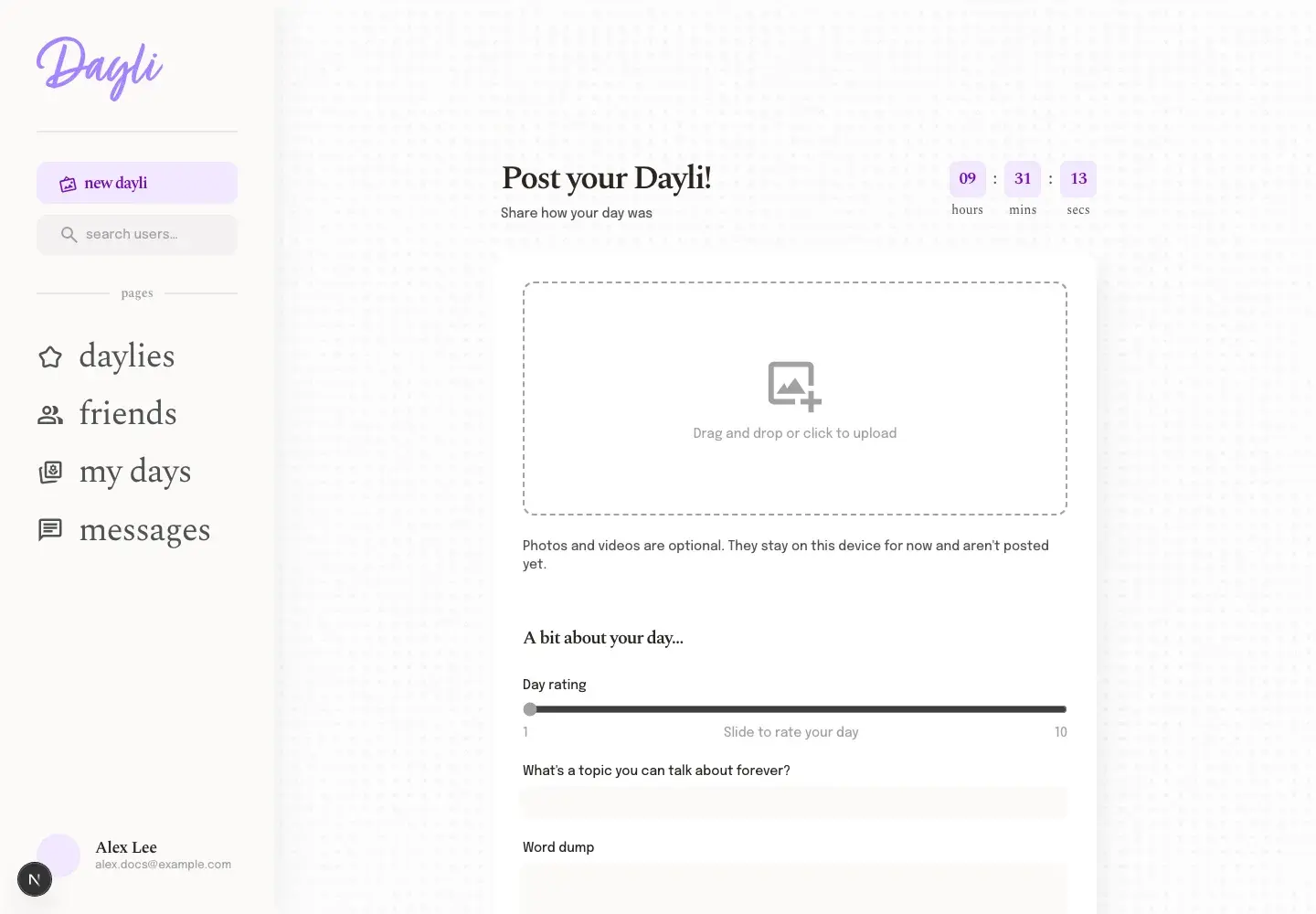
A daily post has a boundary that an ordinary form does not. Someone can start writing before midnight, lose their connection, and press Post after the day changes. Two devices can also submit at once. Dayli must decide which day the post belongs to without trusting either device clock, while keeping a safe retry from creating a duplicate.
The API owns that decision. It calculates dates and midnight boundaries in Pacific/Auckland, selects the prompt for that Auckland date, and accepts at most one active post per author and date. An accepted post is private until the following Auckland midnight unless its author reads it.
Loading diagram...
Why the server owns the day
Using the device's date would make a changed or incorrect clock part of the permission model. Subtracting 24 hours is also wrong around daylight-saving changes, when an Auckland calendar day can contain 23 or 25 hours.
packages/domain/src/auckland-day.ts resolves the current Auckland date and both midnight instants from an injected server clock. The interval includes its starting midnight and excludes the next one. GET /api/v1/posting-days/current returns:
serverNow, so a client can correct its countdown for clock skew;localDate, the server's Auckland calendar date;deadlineAtandreleaseAt, both the next Auckland midnight;- the active prompt ID and text;
hasPostedfor the authenticated author.
The prompt catalog contains one version-one prompt for every month and day, including February 29. Prompt rows are immutable. A replacement gets a new ID, version, and effective date, so an old post continues to point to the prompt it answered. If today's prompt is missing, the posting-day route fails instead of inventing one or silently using another day's prompt.
Accepting one post
The composer sends the Auckland date and prompt ID it received, the reflective answer, rating, an optional caption, an optional tomorrow note, and an explicit solo or friends audience. There is no default audience. Flutter may also send validated media reservation IDs.
The API handles acceptance in this order:
Loading diagram...
A transaction-scoped author lock serializes submissions from different devices. The API reads its clock after taking that lock. Request arrival before midnight is not enough. The transaction must reach the acceptance decision while that Auckland day is still current.
The database adds a second guard with a unique index on (author_id, local_date) for active posts. A post in Trash does not occupy that index, which allows a replacement while the same day remains open.
The main conflict reasons are deliberately specific:
| Reason | Meaning |
|---|---|
POSTING_DAY_CLOSED | The draft belongs to an earlier Auckland date. It cannot be backdated. |
POSTING_DAY_NOT_OPEN | The draft claims a future Auckland date. |
ALREADY_POSTED | Another active post already occupies this day. |
PROMPT_CHANGED | The submitted prompt is not the active prompt for that day. |
MEDIA_NOT_READY | An owned upload is still pending. |
MEDIA_UNAVAILABLE | An upload is missing, expired, failed, claimed, already used, or belongs to someone else. These cases share one response. |
Only an accepted request consumes its idempotency key. This matters when an upload is still running or the prompt needs refreshing. The client can fix the problem and retry with the same key.
Retries are part of the write model
For an accepted submission, post_idempotency_keys stores the author, key, post ID, and a SHA-256 fingerprint of the normalized request. The fingerprint includes every content field and, when present, attachment IDs in order.
An identical retry returns the original post with 201 and Idempotent-Replayed: true, even after midnight. Reusing the key with changed content returns IDEMPOTENCY_KEY_REUSED. If the original post has moved to Trash, a replay returns POST_TRASHED without returning hidden post content. The key remains used.
This is separate from the one-post-per-day constraint. The retry record answers, "Did this exact command already succeed?" The unique index answers, "Does this author already have an active post for this date?" Both are needed.
Drafts on web and Flutter
The clients currently provide different levels of draft persistence.
Flutter persists the whole draft. It writes one per-account draft to flutter_secure_storage, backed by the iOS Keychain or Android protected storage. The record includes the Auckland date, prompt, text, audience, rating, tomorrow note, idempotency key, and attachment upload state. Edits are saved after a 400 ms delay and flushed before submission. A failed request keeps the draft. A 201, including a replay, clears it.
Flutter can keep writing while offline if a saved draft is available. On reopening, a draft for an earlier Auckland date becomes read-only missed work. It is not relabelled as today's post. If midnight passes with the composer open, the app asks the server for the posting day again. If a submission is already in flight, it waits for that request to settle first. Flutter ignores author edits during that request, so a successful response cannot clear words added after the submitted snapshot.
Web keeps the form only in React memory. Its idempotency key survives retries while that mounted form remains open, but a reload, tab close, or navigation loses both the key and unsent fields. It does not write the draft to browser storage. The countdown stops at zero but does not reload the posting day by itself. A late submission lets the API reject the old day, and prompt or future-day conflicts trigger a refresh.
Web disables the Post button while a request is running, but its text fields remain editable. If the request succeeds, navigation can therefore discard words typed after the submitted snapshot. The web form also lets someone select media but currently submits text only and tells them the files stay on the device. These are current implementation limits. Do not describe web drafts as durable, offline-capable, or locked during submission.
Media joins only at acceptance
Flutter compresses and uploads each attachment before posting. POST /api/v1/posts receives reservation IDs rather than file bytes. Inside the post transaction, the API locks those reservations and checks ownership, validation, expiry, cleanup state, prior use, type mix, count, and the 25 MB total. The post and post_media rows commit together.
That design prevents an object path or client claim from acting as attachment permission. The full upload and private download flow lives in Media uploads and storage.
A weather snapshot can ride along
A post may carry one optional weather snapshot: a condition, a whole-degree temperature, and a place name. It is validated and stored in the same write as the post, and it is part of the retry fingerprint, so a retry that adds or changes it conflicts instead of quietly differing. It is chosen while writing and cannot be added or changed once the post is accepted, which is why the edit request has no weather field.
The phone fetches the weather itself and the API never sees a coordinate. How the app asks for location, validates the provider, and holds posting while a lookup runs is in Location and weather contexts.
Release, audience, and later edits
Acceptance stores released_at as the next Auckland midnight. Before then, only the author can read the post. After release:
soloremains author-only;friendscan be read by active, unblocked friends;- a released
friendspost on a public profile can also be read through profile and direct-detail routes.
The friends feed does not show today's newly accepted post. It shows the Auckland date released at the most recent midnight. Friends and feed visibility explains that read policy and the difference between feed, profile archive, and detail.
An author may later edit the answer, caption, rating, or audience. The prompt, Auckland date, media, weather, and tomorrow note do not change. A real change stores the previous version as an immutable revision in the same transaction. The request carries expectedRevisionCount, so a stale editor gets a conflict instead of overwriting another edit. Sending the already-saved values is a no-op, which also makes an edit retry safe. Reflection and history follows the archive, detail, revision, tomorrow-note, and Trash flows.
Moving a post to Trash hides it from normal post, revision, and media reads immediately. Restore and cleanup code exists, but the owner Trash routes and destructive worker remain opt-in and disabled by default. This is different from ordinary editing and should not be presented as generally activated deployment behavior.
Tomorrow notes stay separate
A tomorrow note is stored in tomorrow_notes, not in the post or its revision history. Its available_on date is the next Auckland date. The permission helper requires both the author identity and an Auckland date on or after that date.
Post creation returns only the availability date. Feed, profile archive, post detail, media, and revision projections never return the note text. The current API contains the storage and visibility helper, but no user-facing route or client screen for reading the note was found in the checked-in implementation. The privacy rule is implemented at the data and permission layers, while the retrieval experience is still missing.
Opening the composer from Siri and shortcuts
Flutter can open today's composer from outside the app. On iOS, an App Intent adds Siri and Shortcuts phrases such as "Open today's dayli in Dayli". On Android, long-pressing the app icon offers a New dayli launcher shortcut. Both open the link dayli://app/post, optionally with ?rating=7.
rating is the only parameter read, and only a whole number from 1 to 10 is used. It fills the slider and nothing else: no audience is chosen and nothing is posted until the author taps Post. Opening the same link again restores its rating even after the slider moved. A signed-out link waits until sign-in and username setup finish, and a dayli:// link to any other path opens home. The repository guide at docs/dayli/native-composer-entry-points.md lists the manual device checks, which have not yet been run on a physical device.
What the implementation taught us
- Calendar boundaries should be calculated as Auckland midnights, not as elapsed 24-hour periods.
- The authoritative deadline check belongs after the author lock, close to the accepted write.
- Idempotency and domain uniqueness solve different races.
- A client should freeze author edits while submitting, or it may clear words that were never part of the accepted request. Flutter does this. Web currently disables only the Post button.
- Private future content needs its own projection. Leaving tomorrow notes out of ordinary post objects makes an accidental feed leak less likely.
- A countdown is interface help, not permission. The server still decides whether the day is open.
Code and verification
The main API code is under apps/api/src/features/posting-days and apps/api/src/features/posts. Auckland date handling is in packages/domain/src/auckland-day.ts, and post tables are in packages/db/src/schema/index.ts. Web composer code is under apps/web/app/(main)/post; Flutter draft and composer code is under apps/mobile/lib/drafts and apps/mobile/lib/compose, and its weather lookup is under apps/mobile/lib/weather.
Unit tests cover normal days, both daylight-saving transitions, leap day, prompt selection, conflict mapping, deadline refresh, send locking, and idempotent replay. PostgreSQL integration tests cover the author advisory lock, one active post per day, media association, Trash replay behavior, and transaction rollback. The database-backed suites require the repository's isolated PostgreSQL fixture and are not proof of a deployed environment.